Tuesday, October 19, 2010

Difference b/w CSS1, CSS2 & CSS3

Cascading Style Sheets (CSS) is a style sheet language used to describe the presentation semantics (the look and formatting) of a document written in a markup language. Its most common application is to style web pages written in HTML and XHTML, but the language can also be applied to any kind of XML document, including SVG and XUL.

CSS 1
The first CSS specification to become an official W3C Recommendation is CSS level 1, published in December 1996. Among its capabilities are support for:

Font properties such as typeface and emphasis
Color of text, backgrounds, and other elements
Text attributes such as spacing between words, letters, and lines of text
Alignment of text, images, tables and other elements
Margin, border, padding, and positioning for most elements
Unique identification and generic classification of groups of attributes
The W3C no longer maintains the CSS1 Recommendation.

CSS 2CSS level 2 was developed by the W3C and published as a Recommendation in May 1998. A superset of CSS1, CSS2 includes a number of new capabilities like absolute, relative, and fixed positioning of elements and z-index, the concept of media types, support for aural style sheets and bidirectional text, and new font properties such as shadows. The W3C maintains the CSS2 Recommendation.

CSS level 2 revision 1 or CSS 2.1 fixes errors in CSS2, removes poorly-supported features and adds already-implemented browser extensions to the specification. While it was a Candidate Recommendation for several months, on June 15, 2005 it was reverted to a working draft for further review.[18] It was returned to Candidate Recommendation status on 19 July 2007.

CSS 3
CSS level 3 has been under development since December 15, 2005.The W3C maintains a CSS3 progress report. CSS3 is modularized and consists of several separate recommendations. The W3C CSS3 Roadmap provides a summary and introduction.
You can check my web page for more info about Web Interactivity :  HTML QUERY

Monday, October 18, 2010

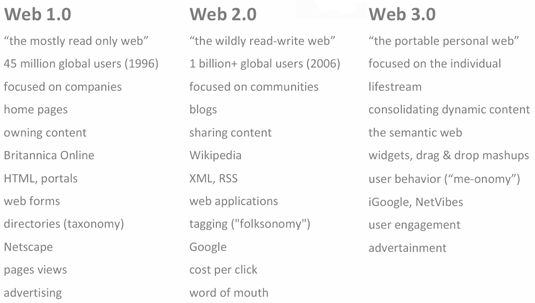
Difference b/w Web 1.0, 2.0 & 3.0.


Web 1.0 – That Geocities & Hotmail era was all about read-only content and static HTML websites. People preferred navigating the web through link directories of Yahoo! and dmoz.

Web 2.0 – This is about user-generated content and the read-write web. People are consuming as well as contributing information through blogs or sites like Flickr, YouTube, Digg, etc. The line dividing a consumer and content publisher is increasingly getting blurred in the Web 2.0 era.

Web 3.0 – This will be about semantic web (or the meaning of data), personalization (e.g. iGoogle), intelligent search and behavioral advertising among other things.
If that sounds confusing, check out some of these excellent presentations that help you understand Web 3.0 in simple English. Each takes a different approach to explain Web 3.0 and the last presentation uses an example of a "postage stamp" to explain the "semantic web".

for more detais click www.web14.blogspot.com
You can check my web page for more info about Web Interactivity :  HTML QUERY

Friday, October 15, 2010

Difference b/w Alt & Title ?

The ALT Attribute for Images

The W3C states that alternate text is “for user agents that cannot display images, forms, or applets, this attribute specifies alternate text.” ALT attributes “let authors specify alternate text to serve as content when the element cannot be rendered normally.” . If an image file cannot be displayed, at least users can see its ALT text. What kind of content should go into an image’s ALT attribute?

The TITLE attribute for Links

The W3C states that a TITLE attribute is meant to offer “advisory information about the element for which it is set.” In short, the TITLE attribute should add additional information that compliments the linked text.
You can check my web page for more info about Web Interactivity :  HTML QUERY

What is Reset CSS ?

Reset.CSS is simply a collection of CSS styles which removes and neutralizes the inconsistent default styling of HTML elements.
By using Reset.CSS, you simply clear the default values of web browsers and you won’t need to alter these differences for every element again.


There are 2 popular Reset.CSS styles:

* YUI Reset CSS
* meyerweb.com Reset.CSS


YUI Reset CSS is following:-

body,div,dl,dt,dd,ul,ol,li,h1,h2,h3,h4,h5,h6,pre,form,fieldset,input,textarea,p,blockquote,th,td {
margin:0;
padding:0;
}
table {
border-collapse:collapse;
border-spacing:0;
}
fieldset,img {
border:0;
}
address,caption,cite,code,dfn,em,strong,th,var {
font-style:normal;
font-weight:normal;
}
ol,ul {
list-style:none;
}
caption,th {
text-align:left;
}
h1,h2,h3,h4,h5,h6 {
font-size:100%;
font-weight:normal;
}
q:before,q:after {
content:'';
}
abbr,acronym { border:0;
}


meyerweb.com Reset.CSS is following:-

html, body, div, span, applet, object, iframe,
h1, h2, h3, h4, h5, h6, p, blockquote, pre,
a, abbr, acronym, address, big, cite, code,
del, dfn, em, font, img, ins, kbd, q, s, samp,
small, strike, strong, sub, sup, tt, var,
dl, dt, dd, ol, ul, li,
fieldset, form, label, legend,
table, caption, tbody, tfoot, thead, tr, th, td {
margin: 0;
padding: 0;
border: 0;
outline: 0;
font-weight: inherit;
font-style: inherit;
font-size: 100%;
font-family: inherit;
vertical-align: baseline;
}
/* remember to define focus styles! */
:focus {
outline: 0;
}
body {
line-height: 1;
color: black;
background: white;
}
ol, ul {
list-style: none;
}
/* tables still need 'cellspacing="0"' in the markup */
table {
border-collapse: separate;
border-spacing: 0;
}
caption, th, td {
text-align: left;
font-weight: normal;
}
blockquote:before, blockquote:after,
q:before, q:after {
content: "";
}
blockquote, q {
quotes: "" "";
}
You can check my web page for more info about Web Interactivity :  HTML QUERY